a short write-up on the tl;dr toggle you see on every read here, and how it’s wired.
what it looks like
every read on this blog has a summarize toggle. flip it, and you get a short tl;dr right above the article - generated by the model built into chrome, on your device.
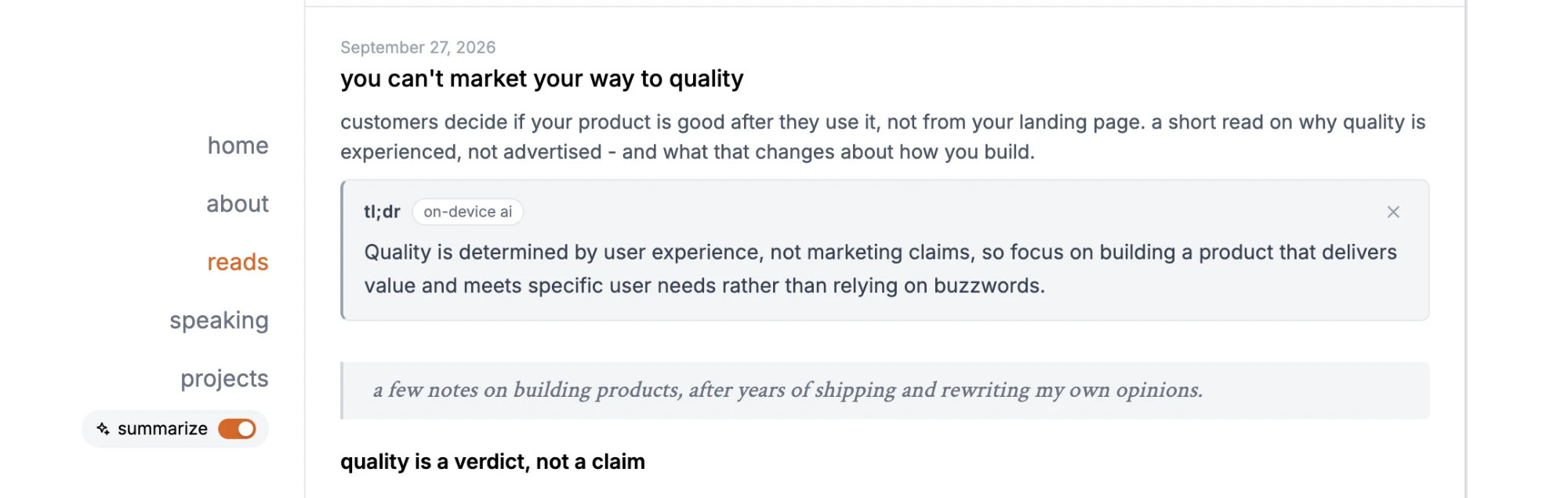
no server, no api key, no ai bill. the article never leaves your browser.
how it’s wired
it runs on chrome’s summarizer api (gemini nano under the hood), through pwafire. pwafire gives me two things - a feature check, and a streaming call:
import { summarizerStream } from "pwafire/summarizer";
import { summarizer as canSummarize } from "pwafire/check";

if (canSummarize()) {
  await summarizerStream(text, (chunk) => (output.textContent += chunk), {
    type: "tldr",
    format: "plain-text",
    length: "short"
  });
}
the text i pass in is the title plus the article body, with code blocks stripped out - code is noise for a tl;dr.
the details that make it feel right
- it only shows up where it works. no support, no toggle. browsers without built-in ai never see a broken button.
- the first run is honest. the model downloads once, so the panel says so and shows a progress percentage, instead of a spinner that looks stuck.
- it streams. the summary writes itself in as the model produces it, so it feels instant even when it isn’t.
- it remembers. each summary is cached on your device for a week. edit the article and the cache knows - it fingerprints the text, so a stale tl;dr never shows.
- errors speak human. “on-device ai isn’t available in this browser yet” beats a stack trace.
what i track, and what i don’t
i log one event: whether a summary worked, and the error code if it didn’t. the article text and the summary itself never get sent anywhere.
bottom line
built-in ai is a nice fit for a blog. it’s small, private, free to run, and when a browser doesn’t support it, nothing breaks.
similar write-up for reference: pwafire adds web ai apis for modern web apps